Fill Matte Holes
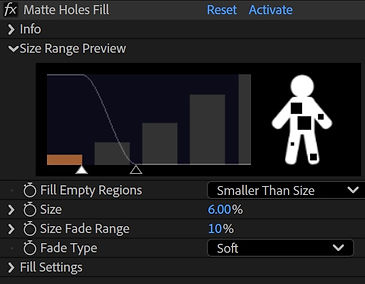
Overview:
Enables plugging holes in the alpha according to size and a fade range to reduce flickering.
Parameters:
Setup Preview:
Shows the affected size range.
Fill Empty Regions:
Choose whether to fill holes bigger or smaller than the set size.
Size:
The size of the hole at which the influence is full.
~0 - very small holes.
100 - the whole frame.
Size Fade Range:
The hole size range where the influence changes from full to none.
0 - No fade. Either fully opaque or fully transparent.
100 - Fade over the full range between the size and the end of the graph.
Fade Type:
Chooses the fade interpolation between opaque and transparent.
Fill Opacity:
The opacity of the filled holes.
Fill Using:
Chooses what to fill the holes with.
Original RGB - Just makes the input pixels opaque.
Custom Color - Set a color to fill the holes with.
Custom Layer - Use the corresponding pixels from a different layer. Good for cases where transparent pixels might contain random values, such as when applying after a keyer or a spill suppressor.
Custom Layer Fitting - Should the current layer and the custom fill layer differ in size, determines how the overlap if handled.
Center Only - Center the layer, and use the naturally overlapping pixels.
Center And Scale To Fit - Stretch the custom layer to match the size of the current layer.